You already know how to design learning experiences. You do it every single day in your classroom.
But when you decide to leave teaching, knowing how to teach isn’t enough. Corporate hiring managers don’t want to hear about your lesson plans; they want to see your instructional design portfolio. This is the single biggest hurdle for transitioning teachers, and it’s where most people get stuck for months.
The good news? You don’t need to spend six months building it from scratch. By leveraging AI tools strategically, you can translate your existing expertise into a professional portfolio that speaks the language of the corporate world, helping you land interviews faster.
Why Your Portfolio Matters More Than Your Resume
When you apply for an instructional design (ID) role, your resume might get you past the initial screening, but your portfolio is what actually gets you the job. It is the tangible proof that you can do the work.
According to industry experts, a portfolio is your most important asset as a new instructional designer . Hiring managers use it to evaluate your visual design skills, your understanding of adult learning theories (like ADDIE or Gagne’s Nine Events), and your ability to solve business problems through training.
For teachers, the portfolio serves a specific purpose: it bridges the gap between academic teaching and corporate training. It shows that you understand the difference between educating children and upskilling adults to meet business objectives.
The Biggest Mistake Teachers Make With Portfolios
The most common error transitioning teachers make is filling their instructional design portfolio with classroom materials. Worksheets, K-12 lesson plans, and colorful classroom newsletters do not belong here.
Corporate recruiters are looking for specific deliverables:
•eLearning modules (built in tools like Articulate Storyline or Adobe Captivate)
•Storyboards and scripts
•Needs analysis reports
•Facilitator guides for corporate workshops
If your portfolio looks like a teacher’s Google Drive, hiring managers will assume you don’t understand the corporate landscape. You need to build projects that solve hypothetical (or real) business problems, such as onboarding new employees, training sales teams on a new product, or compliance training.
How AI Accelerates Your Portfolio Creation
Building these corporate assets used to take transitioning teachers hundreds of hours. Today, AI can act as your assistant, helping you generate the raw materials so you can focus on the design and strategy.
Here is how you can use AI to build your instructional design portfolio faster.
1. Generating Realistic Business Scenarios
You cannot build a corporate training module without a corporate problem. Instead of staring at a blank page, use AI to generate realistic scenarios.
You can prompt an AI tool like ChatGPT or Claude with: “Act as a corporate Learning and Development manager. Give me three realistic scenarios where a company needs a 10-minute eLearning module to solve a performance issue. Include the target audience, the business goal, and the specific skills lacking.”
Suddenly, you have the foundation for your flagship project.
2. Drafting Storyboards and Scripts
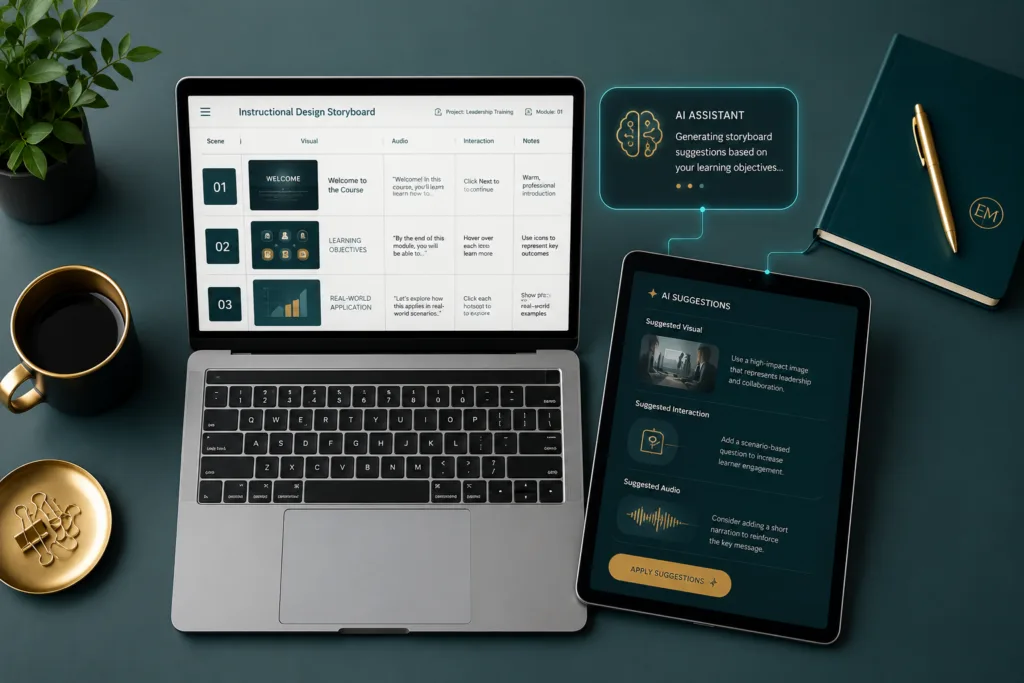
A storyboard is the blueprint of your eLearning course. It outlines the visuals, the audio script, and the interactive elements for every single slide.
Once you have your scenario, you can feed it back into the AI and ask it to draft a storyboard. AI is incredibly efficient at breaking down content into digestible, slide-by-slide chunks. While the AI will give you a solid first draft, your job as the expert is to refine it, ensuring the learning objectives are met and the tone is appropriate.
Recent trends show that 84% of instructional designers have used AI tools like ChatGPT in their work, proving that this is becoming an industry standard .
3. Creating Custom Assets and Graphics
Visual design is a critical component of your instructional design portfolio. If you don’t have a graphic design background, AI image generators (like Midjourney or Canva’s AI tools) can help you create cohesive, professional graphics for your modules.
You can generate custom illustrations, background images, or even character avatars to use in your scenario-based learning projects. This ensures your portfolio looks polished and modern, without requiring expensive stock photo subscriptions.

Structuring Your Flagship Project
You do not need ten projects in your portfolio. Quality always beats quantity. Most successful transitioning teachers land jobs with just one or two highly polished “flagship” projects.
A strong flagship project in your instructional design portfolio should include:
•The Problem: A brief explanation of the business problem you are solving.
•The Solution: How your training addresses the problem.
•The Process: A look behind the scenes (e.g., your storyboard, action map, or needs analysis).
•The Final Product: A functional, interactive eLearning module (often built in Articulate Storyline).
By showing your process, you prove that you didn’t just make something pretty—you applied instructional design methodology to solve a problem.
The Tools You Need to Learn
While AI can help you write and plan, you still need to build the final product. To be competitive in 2025, you should familiarize yourself with the industry-standard tools.
The most requested software in ID job postings is Articulate Storyline 360 . It is the industry standard for creating interactive eLearning. They offer a free trial, which is usually enough time to build your portfolio project if you have your storyboard ready.
Other valuable tools include:
•Canva or Adobe Illustrator: For visual design and layout.
•Vyond: Another popular eLearning authoring tool.
•A website builder: You need a place to host your portfolio. Squarespace, Wix, or Google Sites are great options.
Your Next Steps to Escape the Classroom
Transitioning out of the classroom is entirely possible, and the corporate training market is booming, projected to reach over $800 billion by 2033 . Your skills are needed.
Here is your action plan for this week:
1.Pick a topic: Use AI to generate a corporate business problem.
2.Draft a storyboard: Use AI to help you outline the learning experience.
3.Start building: Sign up for a free trial of Articulate Storyline and bring your storyboard to life.
You don’t have to start from zero. You already have the teaching expertise; now, let AI help you translate it into an instructional design portfolio that opens new doors.
Sources
Disclaimer: The information provided in this article is for educational and career guidance purposes only. Career transitions involve individual variables and market conditions. Always conduct your own research and consider your personal circumstances before making significant career decisions.

Hi, I’m Marcos Antonio — a researcher with a deep passion for education and technology.
I created GrowthLane because I’ve seen firsthand the exhaustion that takes hold of so many teachers, and how few people talk about the ways out. I believe educators deserve more time, less burnout, and the freedom to build the next chapter of their own careers — and that artificial intelligence, used the right way, can make all of it happen faster.
Here you’ll find practical strategies to ease your workload with AI, recover from burnout, earn extra income, and — if you choose to — transition into a career beyond the classroom. No magic formulas. Just honest, tested advice, written for the real lives of the people who teach — and grounded in deep research on the subject.
When I’m not writing, you’ll find me exploring new tools, going for long walks, drinking too much coffee, playing online games, and spending time with my family — the greatest purpose of my life. I’m so glad you’re here. Let’s build a brighter path together.